Technical website audit: a method for agencies
How to run a technical website audit: crawling, indexing, speed, security, and prioritization. The step-by-step agency method for clear reports and finding new clients.

In short
- A technical audit covers crawling, indexing, HTTP status codes, redirects, speed (Core Web Vitals), mobile, basic security, and structured data.
- The method has five stages: define the goal and secure access, collect data (crawl and Search Console), manual analysis, impact/effort prioritization, and a report with an action plan.
- A crawl shows what is reachable; Search Console shows what Google keeps: you need to cross-check both.
- Auditing one site at a time is expert work; spotting businesses whose sites show visible flaws upfront, by trade and by city, is what fills your calendar.
A technical website audit checks that Google can crawl, index, and display your pages quickly, and that the site stays secure and usable on mobile. For an agency or freelancer, it is both a billable deliverable and the best prospecting hook: a small business owner responds to a specific flaw on their site, not a generic promise. Here is the full step-by-step method, then how to use it for business development with AutoLeads, our prospecting tool.
What a technical audit covers (and what it does not)
A technical audit analyzes site structure to confirm it is crawlable, indexable, and fast. It surfaces wrong HTTP codes, redirect chains, orphan pages (no internal links point to them), conflicting canonicals, a misconfigured robots.txt file, or junk URLs, per this methodology guide. "Technical analysis" means the same exercise.
The usual scope, detailed by Abondance, includes:
- indexing and bot access: sitemap, robots.txt, noindex directives;
- performance;
- architecture and URLs, internal linking;
- HTTPS and mobile;
- structured data.
A security slice is often added: HTTPS, updates, vulnerable extensions, overly permissive accounts, exposed access. That is pragmatic prevention, not a full cybersecurity audit. State that clearly in your quote so the client knows what you deliver.
A technical audit is distinct from a semantic audit (content, keywords) and a link audit (inbound links). For a local client, it comes first: there is little point writing strong content on a site Google does not index properly.
The five steps of a technical audit
1. Define the goal and gather access
Before any tool, clarify what the client expects: recover traffic after a redesign, prepare a Google Ads campaign, fix a slow site, or simply see where things stand. The goal sets audit depth and report language.
Next gather access: Search Console, Analytics, server or host, and the code repository if there is one, read-only when possible, as Kerynox advises. Many audits stall here: the owner no longer knows who created the Search Console property, the former vendor holds the domain. Ask for access in the first conversation; everything else depends on it.
2. Collect data: crawl and Search Console
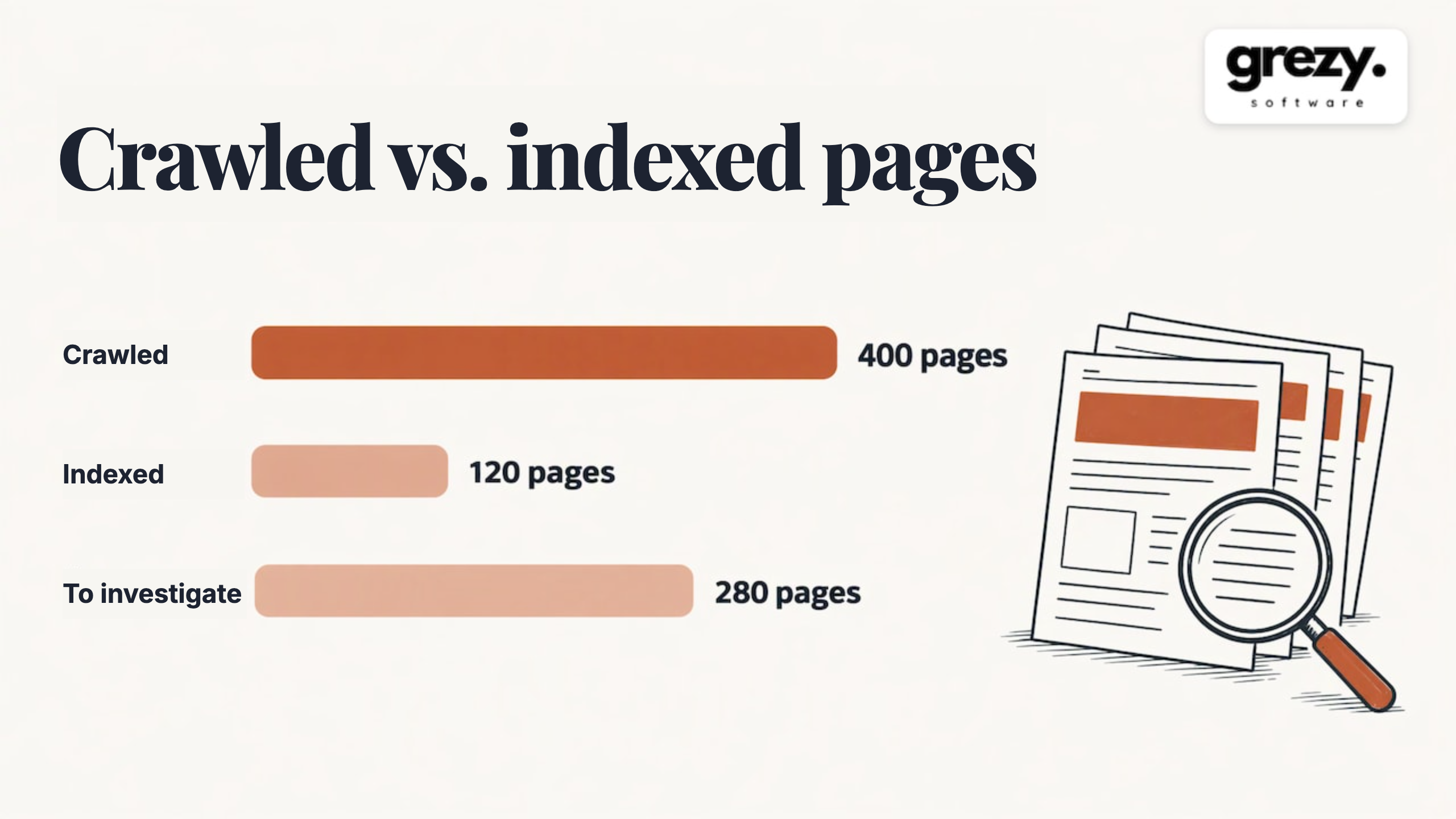
Run a full site crawl with a crawler, then cross-check it with Search Console. The crawl shows what is reachable by following links; Search Console shows what Google kept and why it excluded certain pages, per IndexURL. The page indexing report shows how many URLs Google crawled and indexed and what problems it hit.
The gap between the two is already a diagnosis. A crawl that finds 400 pages while Google indexes only 120 raises a precise question: what is blocking indexing, and on which pages?
For speed, add a measurement tool such as PageSpeed Insights, plus manual navigation of key journeys on mobile and desktop.
3. Analyze crawling, indexing, and URLs
This is the core of the audit. On a representative sample, compare page by page:
- the HTTP status returned (200, 301, 404, 500);
- robots.txt rules;
- robots directives in HTML or headers;
- the canonical URL, the reference version of a page.
IndexURL recommends lining up these signals to judge indexability: a noindex page listed in the sitemap, or a canonical pointing to a redirected page, are classic contradictions.
Then look for:
- redirect chains and loops, which waste crawl budget (the time Google spends on your site);
- 404 errors reached from internal links;
- orphan pages;
- sitemaps listing 3xx or 4xx URLs: Shopify recommends keeping only live URLs and pointing internal links to the latest valid URL.
On an online store, study filters and faceted navigation closely: they can generate many junk URLs and spread crawling across low-value pages.
4. Measure speed and the mobile experience
Core Web Vitals are three metrics Google publishes: LCP (how fast main content loads), INP (responsiveness to interaction), and CLS (visual stability). Google explains that performance is assessed at the 75th percentile of real visits: a site is "good" when at least 75% of visits pass the threshold.
Thresholds to remember, from Poliris documentation:
| Metric | Good | Needs improvement from |
|---|---|---|
| LCP | 2.5 s or less | 4 s |
| INP | 200 ms or less | 500 ms |
| CLS | 0.1 or less | 0.25 |
Separate field data from real users from lab tests, which are repeatable and useful for diagnosis, and split mobile and desktop, as Polprog details. For small local businesses, field data is sometimes missing for lack of traffic: then the lab test is your reference, and say so explicitly in the report.
To find why a site is slow, Ethicweb recommends checking oversized media, third-party scripts, unnecessary JavaScript, render-blocking CSS, caching, hosting, and expensive requests. On a small business's WordPress site, it is almost always uncompressed images, a bloated theme, and too many plugins.
5. Prioritize and deliver an action plan
An audit that lists 140 issues with no ranking does not get read. Classify each problem by impact (performance, security, SEO, user experience) and fix effort: an impact/effort matrix separates quick wins, medium work, and heavy projects, as Kerynox describes. Junto adds a useful criterion for local clients: prioritize by commercial impact, starting with pages that drive calls or quotes.
A typical deliverable, per On Track, includes:
- a one-page executive summary the owner can read;
- a detailed diagnosis with evidence (screenshots, affected URLs);
- an action plan with an owner, deadline, and success metric for each line.
Also offer a follow-up audit about six months after the action plan: it measures progress and naturally opens a retainer.
Which tools for which outcomes
This stack is enough for most small business sites:
- Search Console and Analytics for queries, impressions, clicks, average positions, and indexing status;
- a crawler for the structure that is actually reachable;
- a structured data validator, such as Schema.org's;
- PageSpeed Insights for speed;
- a security header test such as Mozilla Observatory if security is in scope, per Kerynox.
The Shopify France tool list follows the same logic: collect, categorize issues, then build a fix plan.
One rule matters more than tool choice: automated tools surface symptoms; human expertise interprets causes and decides fixes, Monsieur Biz reminds us. A raw software export is not an audit: the client pays for your judgment.
Common mistakes when auditing for a client
- Auditing without a goal. The report becomes a generic list. Reframe the client's request before you run a single crawl.
- Relying on one tool. Crawl alone ignores what Google actually indexed; Search Console alone ignores pages never discovered.
- Mixing field and lab data without saying so, which produces conflicting numbers from one report to the next.
- Delivering one overall score. A score out of 100 reassures or worries without saying what to do. Better: three fixes with estimated hours.
- Forgetting scope. Security, accessibility, GDPR: state what is included and what belongs to another specialty. A standard technical check is not a cybersecurity audit.
Technical audit as a commercial entry point
For a WordPress freelancer or local SEO agency, the bottleneck is rarely audit skill. It is finding businesses each week to present a diagnosis to. Referrals, freelance platforms, and RFPs give an irregular pipeline you do not control.
The logic flips if you start from visible flaws: a plumber in Lyon whose site takes more than four seconds to load on mobile, a Bordeaux restaurant that never replies to Google reviews, a tradesperson with no ads while competitors top the local pack. Each flaw is a concrete reason to write to the owner. A message that opens with "your homepage loads too slowly on mobile" gets attention that "we help businesses grow" does not.
The problem is scale: spotting these flaws by hand for 200 businesses per city takes weeks, and bought contact databases are often stale.
Promo: AutoLeads, prospecting audits to fill your calendar
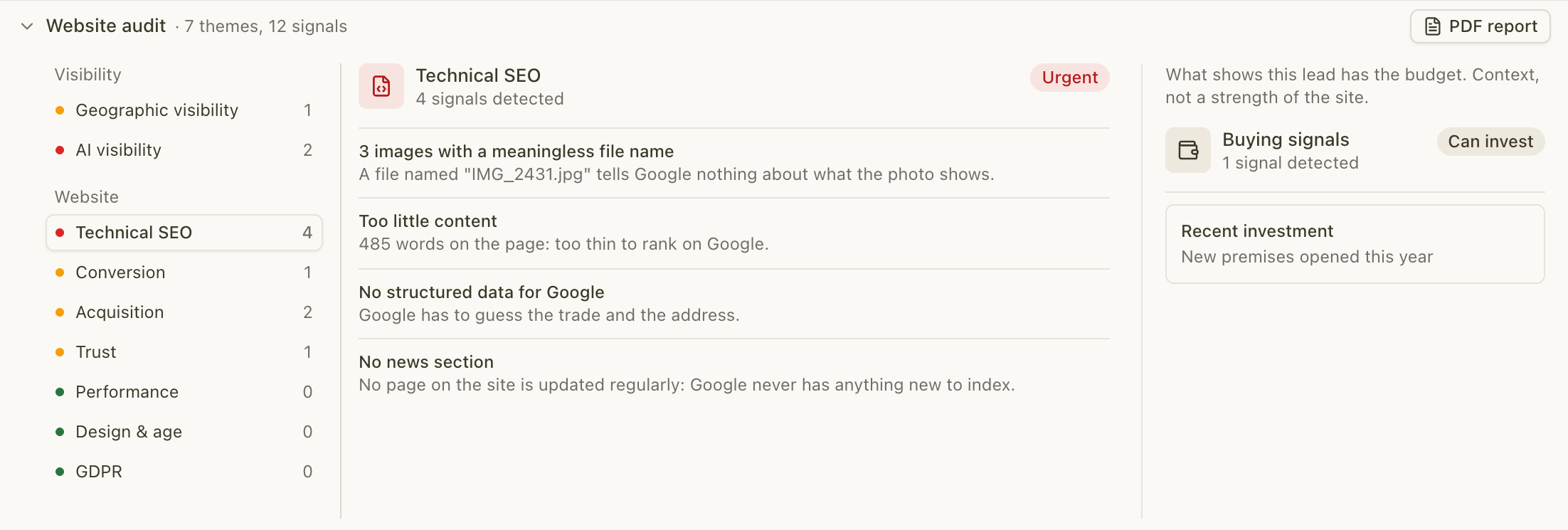
AutoLeads, Grezy's prospecting tool, starts from that logic. You pick a trade and a city, for example "plumbers in Lyon" or "restaurants in Bordeaux". The tool finds those businesses in real time on the web and Google Maps, then audits their online presence: outdated or slow site, weak SEO, no advertising, Google reviews, social networks. It enriches each lead with contacts (owner, email, phone, LinkedIn when found) and drafts email and LinkedIn sequences built on the flaws found.
Sends go out in weekly waves from your mailboxes and accounts, or sync to Lemlist, HubSpot, or CSV export. Replies land in a built-in CRM as tasks. Subscriptions are monthly: Starter at €249 per month, Growth at €499 per month, Scale at €899 per month, with credits consumed by lead volume and enrichments enabled. The "We call for you" option handles appointment booking. See all plans on the AutoLeads pricing page.
Our view
A full technical audit is expert work, and it will stay that way: crawl, cross-check with Search Console, read the code, prioritize. We do not claim a tool replaces that, and that is not the point.
The point is what happens before: who do you pitch your audit to? Strong agencies often depend on word of mouth and hit slow quarters. We believe a concrete diagnosis beats a generic message, and that diagnosis should exist before the first outreach.
That is why AutoLeads audits each business it finds online, drafts messages from real flaws, and sends them from your own inbox. You show up to a small business owner with a specific finding, and keep your time for what you do best: the deep audit, fixes, and client relationships.
Alexis
Frequently asked questions
Sources
- Website audit: method, checklist, and tools (Monsieur Biz)(opens in a new tab) accessed November 21, 2026
- Technical SEO audit: benefits, method, tools (Abondance)(opens in a new tab) accessed November 21, 2026
- Technical website audit (Ethicweb)(opens in a new tab) accessed November 21, 2026
- Complete guide to technical website audits in 2026 (Kerynox)(opens in a new tab) accessed November 21, 2026
- Technical SEO audit: method and checklist (IndexURL)(opens in a new tab) accessed November 21, 2026
- Page indexing report (Search Console Help)(opens in a new tab) accessed November 21, 2026
- Technical SEO Audit: A Checklist for Ecommerce Sites (Shopify)(opens in a new tab) accessed November 21, 2026
- Checklist for a technical SEO audit (Shopify France)(opens in a new tab) accessed November 21, 2026
- How the Core Web Vitals metrics thresholds were defined (web.dev)(opens in a new tab) accessed November 21, 2026
- Technical audit (Poliris Docs)(opens in a new tab) accessed November 21, 2026
- Website audit in 2026: the complete checklist (Polprog)(opens in a new tab) accessed November 21, 2026
- SEO audit: complete methodology 2026 (On Track)(opens in a new tab) accessed November 21, 2026
- SEO audit: the complete 2026 guide (Junto)(opens in a new tab) accessed November 21, 2026